Build & Operate is the third pillar — how you put a specific AI use case into your business and keep it running afterwards. You see the deliverable and the price before you commit. Optional managed operations keep the build secure, monitored, and updated as models change. No MSP relationship required.
Every Build runs inside Microsoft 365 and Azure. That's where we have nine years of depth, and where the security stack we've already deployed for your business naturally extends. The AI tooling on top is chosen per project — for fit, not for partner margin.
We don't deliver AWS-native or GCP-native infrastructure work. If your use case genuinely needs that, we'll say so and recommend a different partner. We earn margin on the engagement, not on the licence — that recommendation costs us nothing.
The patterns below cover most of what businesses ask for. Custom work is quoted on the same engineering discipline — fixed scope, fixed price, written acceptance test before commitment. Most custom Builds fit one of these patterns within ~20%.
DON'T SEE YOUR USE CASE? IF IT FITS THE M365/AZURE INFRASTRUCTURE, WE'LL SCOPE IT TO THE SAME ENGINEERING DISCIPLINE.
Every Build follows the same five-step delivery model. Each step has a defined gate to the next — you always know what's been done, what's next, and how to push back if the work drifts from what you signed.
Defines deliverable, integration points, acceptance test.
Single-page Statement of Work. Scope, price, timeline, acceptance criteria, vendor-neutral architecture statement, 6-month maintenance period included.
Typically 2-week iterations. End-of-sprint demo. You see progress every fortnight; no end-of-project surprises.
You sign off against the criteria written in the SoW. No moving goalposts. No "endless changes" trap.
Documentation, source artefacts, prompts, configs handed to you. Optional handoff into Operate retainer.
AI changes monthly. Vendors update models, deprecate APIs, ship features that quietly change behaviour. Without operations, your $14,000 Build slowly degrades into a fragile, unsupported piece of your tech stack — which is exactly where most internal AI projects end up.
The Operate retainer is the practice that keeps Builds working. Monitoring, security posture, vendor change management, quarterly optimisation, and full documentation maintained so you can always take the work elsewhere.
Telemetry on adoption, cost, errors, drift. Alerts on anomalies.
Build stays aligned to your Bundle or industry standard. Purview controls maintained.
Claude model releases, Copilot updates, API breaks — we test, patch, document.
Usage data analysed, cost-vs-value reviewed, refinements proposed.
Builds include a 6-month maintenance period as standard — automations need tuning, monitoring and small adjustments as they bed in. After that you can extend on retainer, or take everything to another partner with full documentation and source artefacts. The point isn't to make you stay; it's that you choose to.
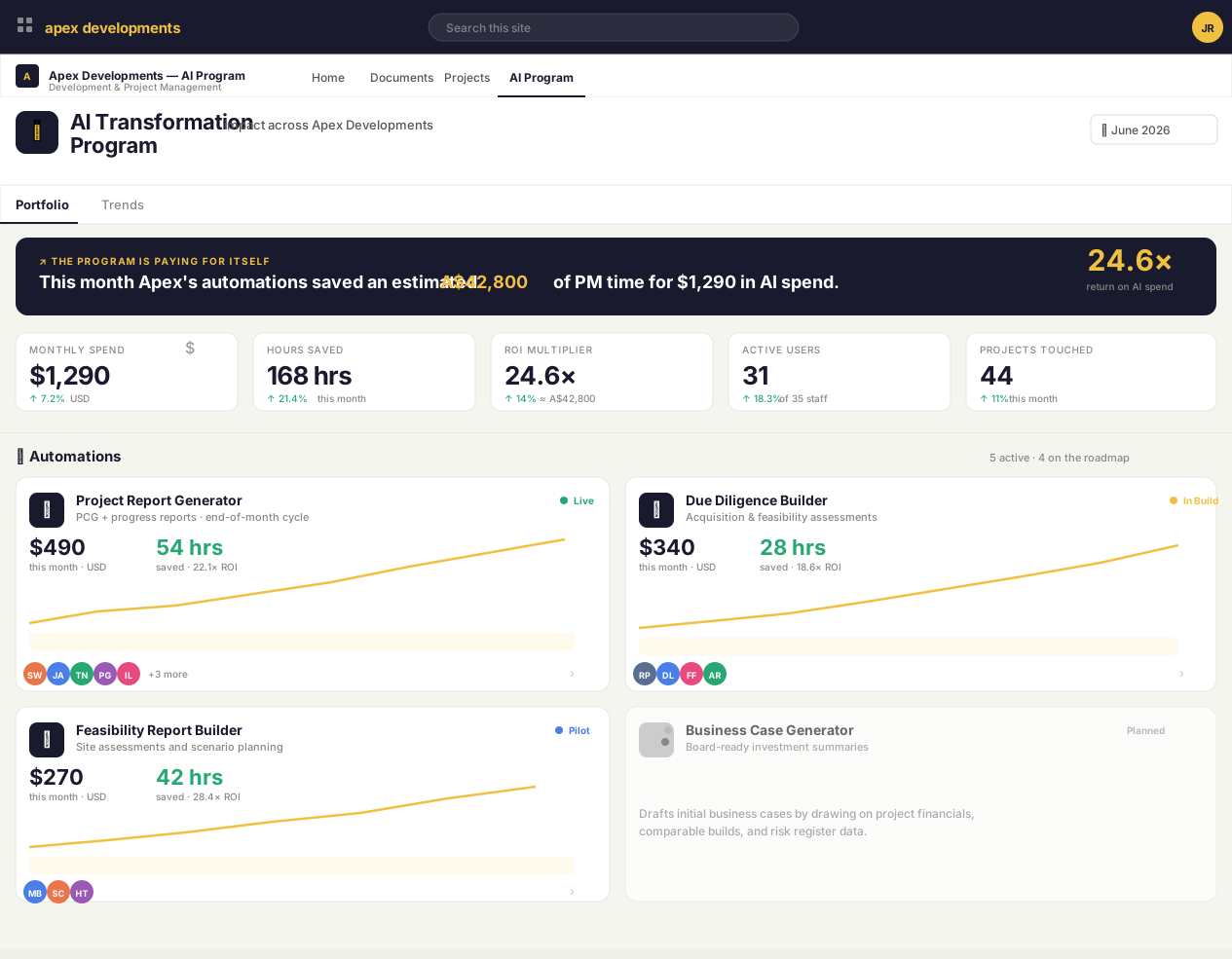
Every Build under an Operate retainer gets a live dashboard inside your own intranet — cost, hours saved, ROI multiplier, who's using each automation, and the residual-risk register your auditor would actually accept. So the question "is the AI program paying off?" has the same answer at the exec table that it does in the engineering log.
Open the live demo
→
The demo is a sanitised version of the dashboard built for our flagship construction-PM client (see the case study). All figures and names are fictitious. Your version lives in your own SharePoint and pulls from your own data.
Most AI engagements quietly create lock-in: bespoke prompts in vendor-locked tooling, data pipelines that don't export cleanly, governance assuming one vendor's posture. We architect against this by default — the checklist below sits inside every SoW so the client knows what they're getting.
See the full /how-we-work commitment →Build is one-off, Operate is monthly. You can take just the Build (most do at first), or pair with Operate if you want the build kept current. Pricing is in every SoW; nothing hidden until invoice.
Did the AI Readiness Sprint, ready to act on something that surfaced in the board summary. Most common entry path.
Have the AI Governance Bundle in place, want a specific Build inside that governance frame. Build inherits the Bundle's controls automatically.
IT/Ops leaders explicitly wanting a partner who'll honestly say "Copilot isn't the right answer here" or "Claude is the better fit". Most channel-aligned partners can't say that.
Sent by an accountant, consultant, or solicitor whose client has surfaced a specific AI need. Scoping session converts the referral.
Have an internal AI build that's struggling — built by someone who's left, vendor that's gone quiet, or simply drifting without maintenance. Operate-only engagements possible after a take-over audit.
Want a build delivered by our AI & Automation team. Sold as a separate engagement — coordinated with the MSP team so it sits cleanly on top of the security stack we already run.
Most custom Builds fit one of the six patterns within ~20%. If yours genuinely doesn't, the scoping session defines the deliverable and writes the SoW from scratch. The engineering discipline is the same — fixed scope, fixed price, written acceptance test before commitment. We don't take blank-cheque engagements.
Yes. Source artefacts (prompts, flows, agent configurations, integration code) vest in you on creation — they live in your repository or tenant, not in ours. Documentation is handed over at the end of the build. Builds include a 6-month maintenance period to support a successful outcome — after that, full documentation makes a move clean.
No — Build is sold independently. Most clients take Operate because the alternative is the build slowly degrading without maintenance, but it's optional. You can also start without Operate, then add it later if the Build matters enough to your business to keep current.
Not natively. Our delivery stack is Microsoft 365 and Azure — that's where nine years of depth lives. If your use case genuinely needs AWS-native or GCP-native infrastructure, we'll say so and recommend a different partner. We earn margin on the engagement, not on the licence, so that recommendation costs us nothing. Where the use case is cloud-agnostic, we'll build on Azure.
The smallest fixed-scope Build is the single-flow automation at from $4,000 — one trigger, one outcome, one written acceptance test. Below that scope we usually steer you to the AI Readiness Sprint ($4,950) instead, which produces a board-ready summary plus an Acceptable Use Policy and AI tooling and Purview review. For micro-scope one-off work we sometimes refer to specialist consultants we trust.
Three differences. First, we have no margin structure that biases AI vendor choice — so when Claude is the right answer instead of Copilot, we say so. Second, every Build inherits our security DNA — Purview controls, Essential Eight alignment, framework mapping for your industry regulator. Third, the engineering discipline — fixed scope, fixed price, written acceptance test, defined maintenance period — is unusual in the Microsoft Partner ecosystem, which tends toward time-and-materials engagements.
Fixed-scope, fixed-price builds with written acceptance tests. Optional managed operations keep the build secure as models and vendors change. You see the deliverable and the price before you commit.